Skip to content

Product

Everything you need to go from feedback to decision

11 capabilities that work together — intake, grouping, change tracking, and generation — so every run ends in an action, not another chart.

01Intake

Connected sources

Feedback arrives on its own

Every project gets its own private email address: forward a thread, or set one auto-forward rule, and feedback lands by itself. Connect Zendesk or Intercom, your App Store or Google Play reviews, or a Slack channel and they keep filling in the background, accumulating into a batch you run whenever you're ready. CSV and pasted text are still there for one-offs — but the point is that you stop having to remember.

  • Zendesk, Intercom, App Store and Google Play reviews, Slack, and email-in
  • Batches accumulate — run them when you're ready
  • CSV or pasted text still work for one-offs
gliddesignal · project / integrations
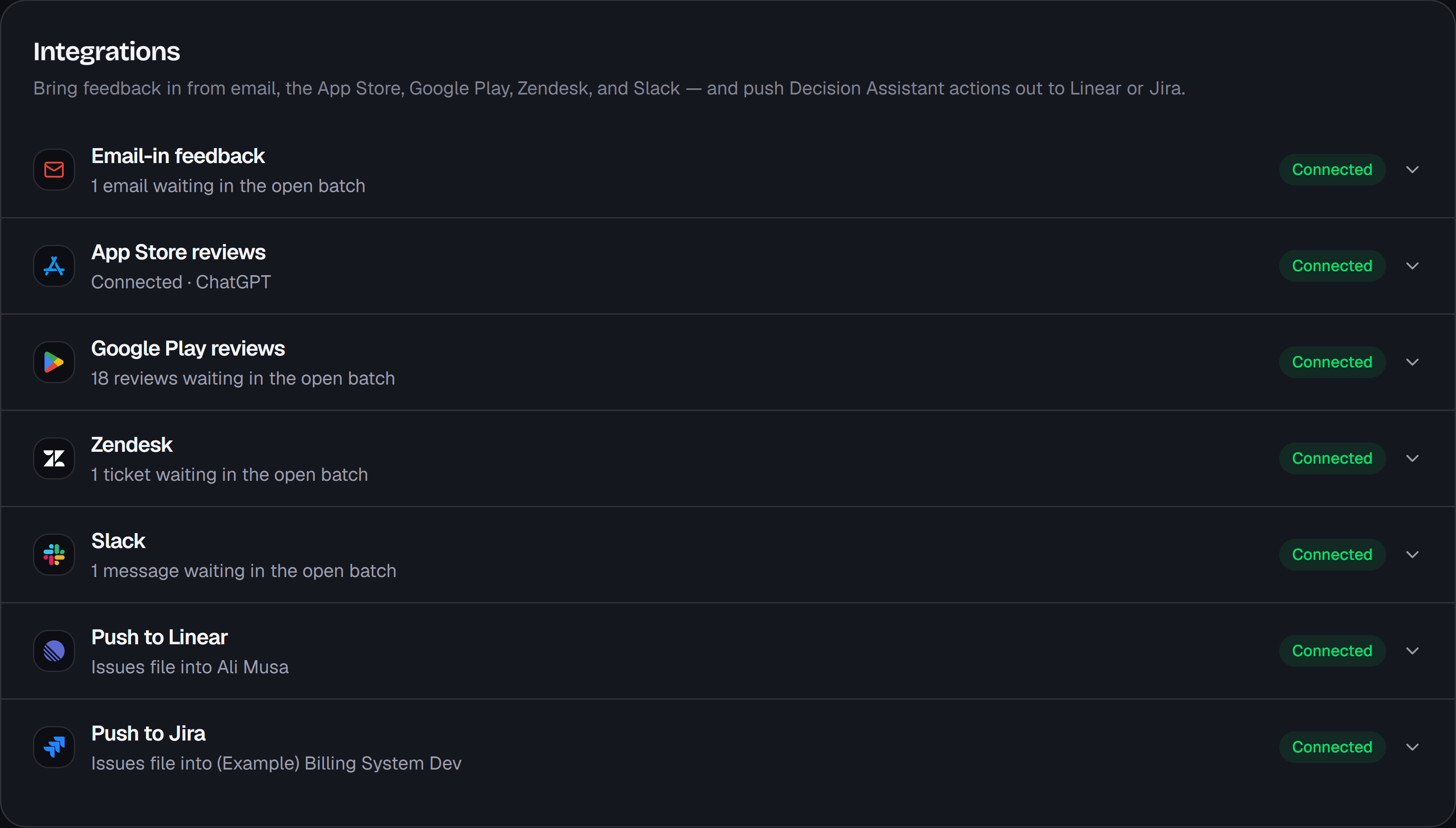
The Integrations tab, headed “Bring feedback in from email, the App Store, Google Play, Zendesk, and Slack — and push Decision Assistant actions out to Linear or Jira.” Seven rows, each marked Connected: Email-in feedback with one email waiting in the open batch, App Store reviews, Google Play reviews with 18 waiting, Zendesk with one ticket, Slack with one message, Push to Linear, and Push to Jira.
Captured from the app. The dataset is a sample built for a fictional banking app — the analysis is the product's own.

02Grouping

Top 5 problems

Emergent themes, ranked — with real sub-issue counts

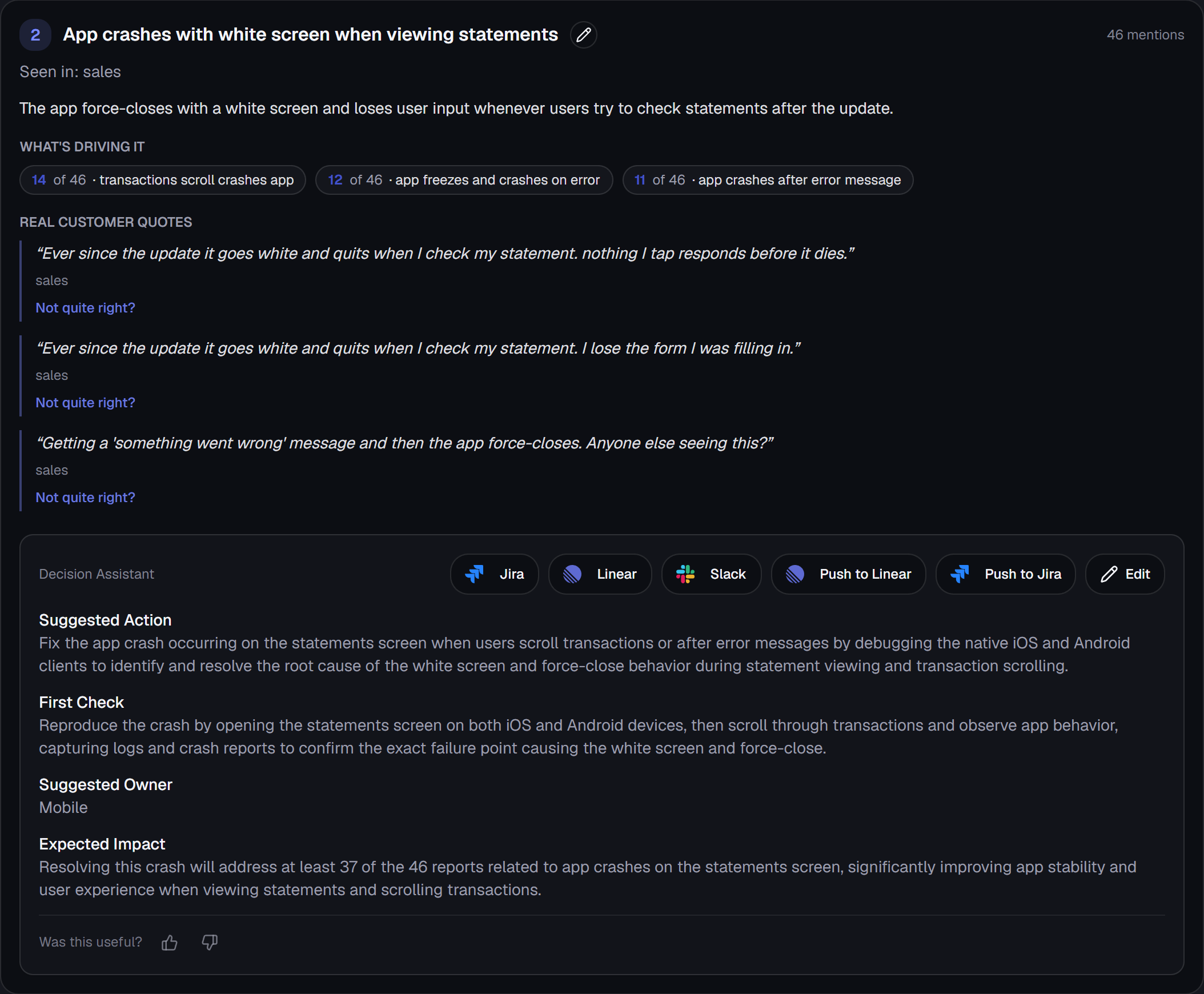
Recurring complaints are clustered by meaning — not keywords — so themes like Checkout or Search surface on their own, then rank into the five that matter most. Each carries a mention count, the sources it showed up in, real customer quotes, and sub-issue counts.

  • Clustered by meaning, so themes surface on their own
  • Real sub-issue counts — "8 of 17 are about the CVV step"
  • Mention counts, sources, and verbatim quotes for each
gliddesignal · run / top problems
A ranked problem on the Top Problems screen. Problem two, “App crashes with white screen when viewing statements”, carries 46 mentions and breaks into three sub-issues: 14 of 46 transactions scroll crashes app, 12 of 46 app freezes and crashes on error, 11 of 46 app crashes after error message. Three verbatim customer quotes sit below it, each with a “Not quite right?” correction link, then a Decision Assistant panel with a suggested action, a first check, a suggested owner of Mobile, and the expected impact on 37 of the 46 reports — with Jira, Linear and Slack buttons above it.
Captured from the app. The dataset is a sample built for a fictional banking app — the analysis is the product's own.

03Grouping

Feature pain map

See which part of the product the pain is in

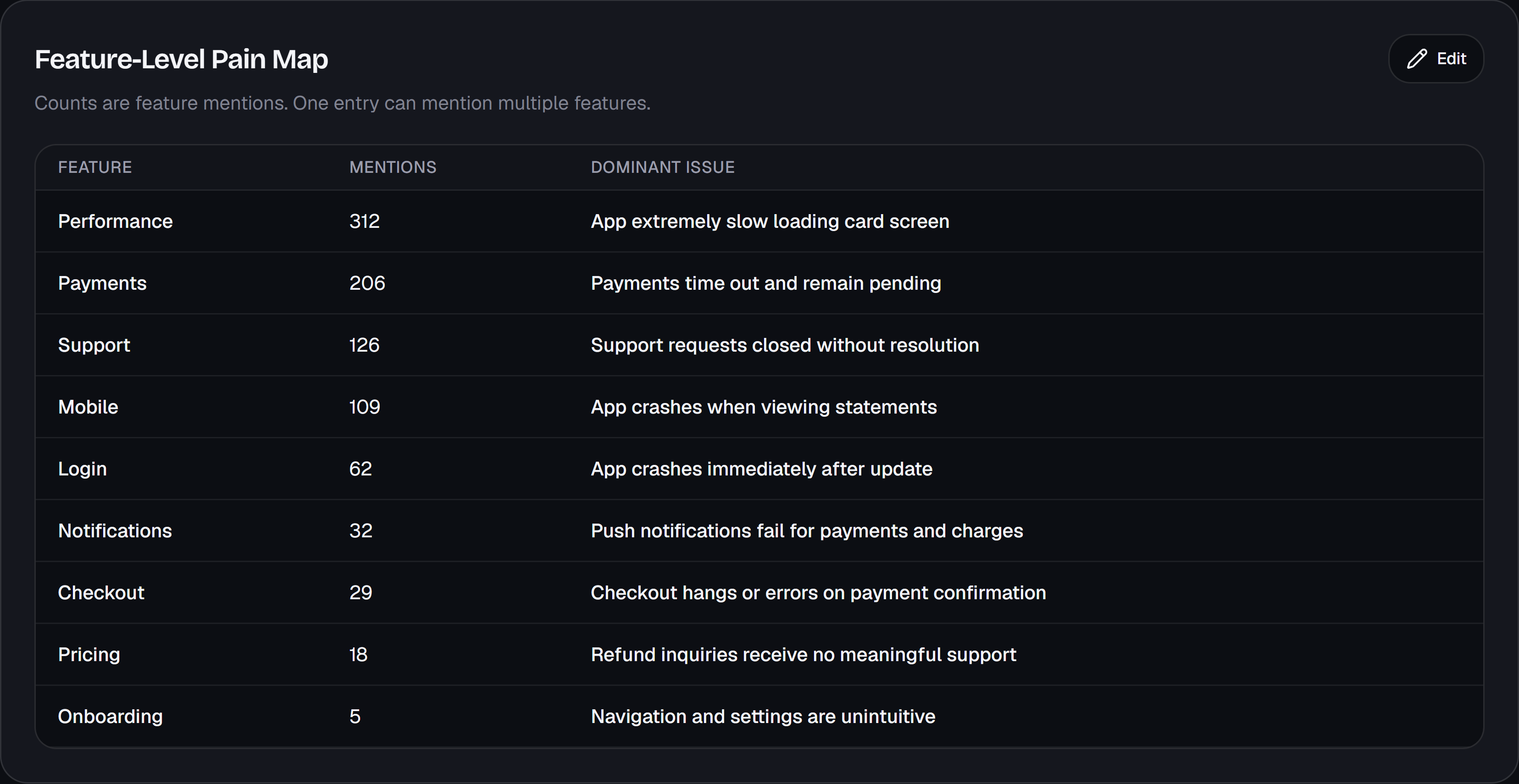
Above the individual problems sits a map of your product's surface — Checkout, Login, Notifications, Onboarding — with how much of this batch's feedback landed on each and the single issue driving it. It's the view that tells you whether you have five unrelated bugs or one area quietly falling over, which is usually a different conversation with a different owner.

  • Feedback totalled by area of the product, not by ticket
  • The dominant issue named for each area
  • Shows when several ranked problems share one root surface
gliddesignal · run / pain map
The Feature-Level Pain Map, a table of features by mention count with each one's dominant issue: Performance 312 with the app extremely slow loading the card screen, Payments 206 with payments timing out and remaining pending, Support 126, Mobile 109, Login 62, Notifications 32, Checkout 29, Pricing 18, Onboarding 5. A line under the heading notes that counts are feature mentions and one entry can mention several features.
Captured from the app. The dataset is a sample built for a fictional banking app — the analysis is the product's own.

04Change

What changed

Know what's worsening, new, improving, or resolved

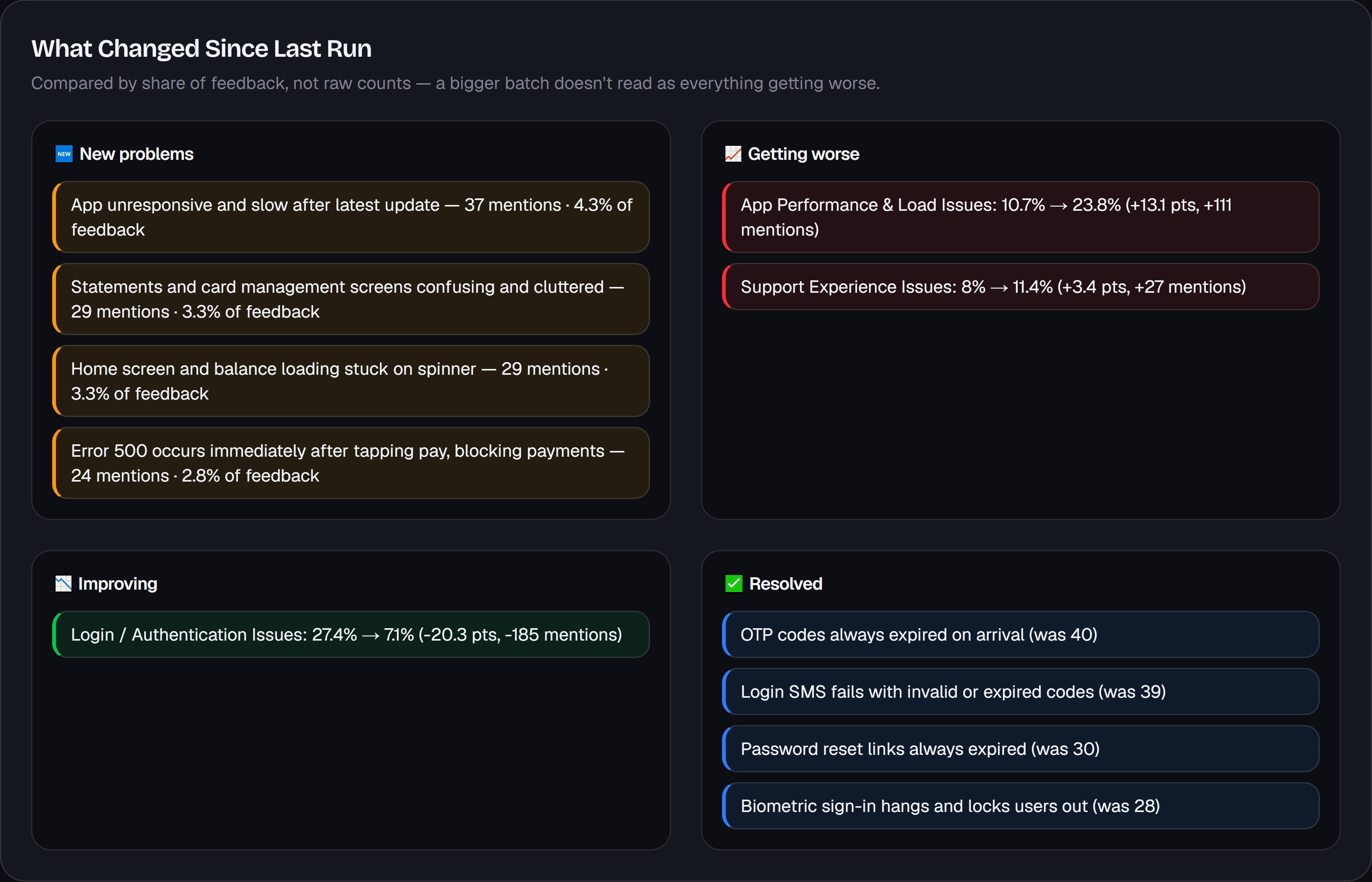
From your second run on, GliddeSignal compares against the previous run automatically, by theme, worst first: what's getting worse, what's new, what's improving, what's resolved. A recurring theme is matched to your last run before it's named, so it keeps its title instead of coming back under a new one and breaking the trend. It's how you prove a fix actually landed — and the reason to run on a regular cadence. With no prior run, nothing is invented.

  • Getting worse, new, improving, resolved — by named theme
  • Themes keep their names across runs, so a trend stays readable
  • Proof a fix worked, not a static snapshot
gliddesignal · run / what changed
What Changed Since Last Run, in four panels, compared by share of feedback rather than raw counts. New problems lists four, led by the app being unresponsive and slow after the latest update at 37 mentions. Getting worse shows App Performance and Load Issues rising from 10.7% to 23.8% and Support Experience Issues from 8% to 11.4%. Improving shows Login and Authentication Issues falling from 27.4% to 7.1%, 185 fewer mentions. Resolved lists four problems including OTP codes always expired on arrival.
Captured from the app. The dataset is a sample built for a fictional banking app — the analysis is the product's own.

05Generation

Executive memo

A one-page decision memo, ready to share

One click turns the run into a one-page memo — this period's customer reality, what got worse, what's new, what improved, what's resolved, and the top three actions — written to send to founders or leadership as-is. Tweak any of it inline before you do.

  • One page, always — however big the run was
  • Four trend sections, so a new problem isn't filed as a worsening one
  • Exactly three recommended actions — no filler
  • Editable inline, grounded in the run's own evidence
gliddesignal · run / executive memo
The Executive Decision Memo inside the app, subtitled “One-page memo you can paste into Slack”, with Regenerate Memo, Copy, Export PDF, Share and Edit buttons above it. Sections run: executive summary, this month's customer reality, what got worse — App Performance and Load Issues up from 10.7% to 23.8%, now 207 mentions — what improved, listing Login and Authentication down from 27.4% to 7.1% and four problems resolved outright, and the top three recommended actions. A “Was this memo useful?” prompt sits at the foot.
Captured from the app. The dataset is a sample built for a fictional banking app — the analysis is the product's own.

06Generation

Shareable memo

Send it as a link, or attach the PDF

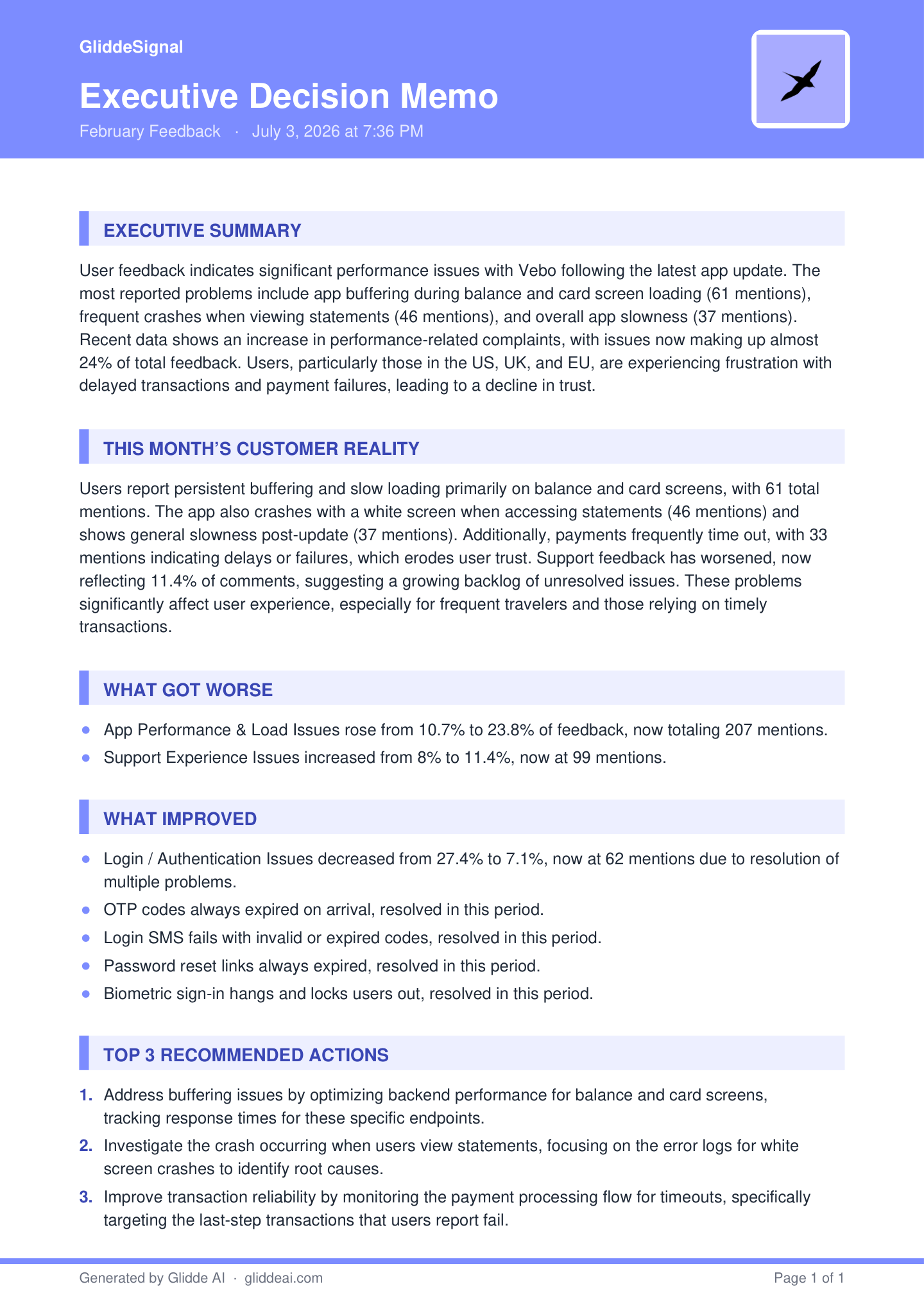
Two ways out of the app. Turn any memo into a read-only link and send it to your CEO, your board, or whichever team owns the fix — they open it in a browser with no account, no seat and nothing to install. Once a link exists you can copy it again, open the page your reader sees, or unshare it, all from the run itself. Or export the same memo as a one-page branded PDF when you'd rather attach a file to the email.

  • A read-only link — no account to open it, unshare it anytime
  • Or the same memo as a one-page branded PDF
  • Either way the reader sees the memo only, with no edit controls
executive-memo.pdf · page 1 of 1
The exported one-page PDF of the executive memo, on GliddeSignal letterhead: a header band carrying the title, the project name February Feedback and the generation date, then Executive Summary, This Month's Customer Reality, What Got Worse — App Performance and Load Issues from 10.7% to 23.8%, now 207 mentions, and Support Experience Issues from 8% to 11.4% — What Improved, listing Login and Authentication down from 27.4% to 7.1% plus four problems resolved, and Top 3 Recommended Actions. The footer reads “Generated by Glidde AI · gliddeai.com”, “Page 1 of 1”.
Captured from the app. The dataset is a sample built for a fictional banking app — the analysis is the product's own.

07Action

Problem actions

Every problem leaves as a ticket, not a to-do

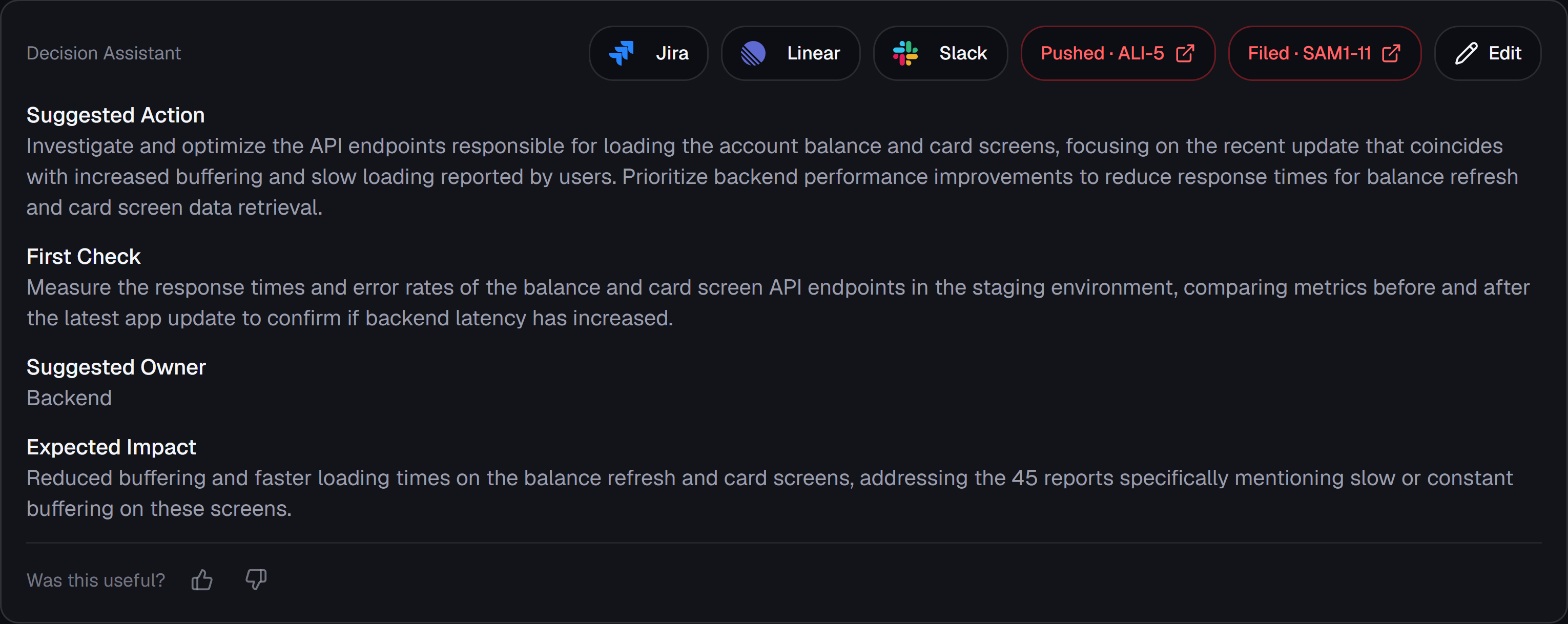
Every top problem gets a Decision Assistant, in the order you'd actually work it: a first diagnostic check, a suggested owner, one sprint-sized action, and the expected impact. One click files it into Linear or Jira as a real issue — with the customer quotes attached as evidence, plus the sub-issue counts and how the problem has trended — and the button turns into a link to the ticket. It's conservative by design: a validation step when the evidence is thin, a specific fix when the pattern is clear.

  • First check, owner, action, and expected impact — in that order
  • Files a real Linear or Jira issue, quotes and trend attached
  • Validate-before-prescribe when the evidence is thin
gliddesignal · run / decision assistant
A problem's Decision Assistant with Jira, Linear and Slack buttons along the top. The action has already been filed in both trackers, so two red buttons read “Pushed · ALI-5” and “Filed · SAM1-11” and link out to the issues. Below them: a suggested action to investigate and optimise the balance and card screen API endpoints, a first check measuring their response times and error rates in staging, a suggested owner of Backend, and the expected impact on the 45 reports mentioning buffering.
Captured from the app. The dataset is a sample built for a fictional banking app — the analysis is the product's own.

08Interrogate

Ask your feedback

Ask a question, get an answer it can actually back up

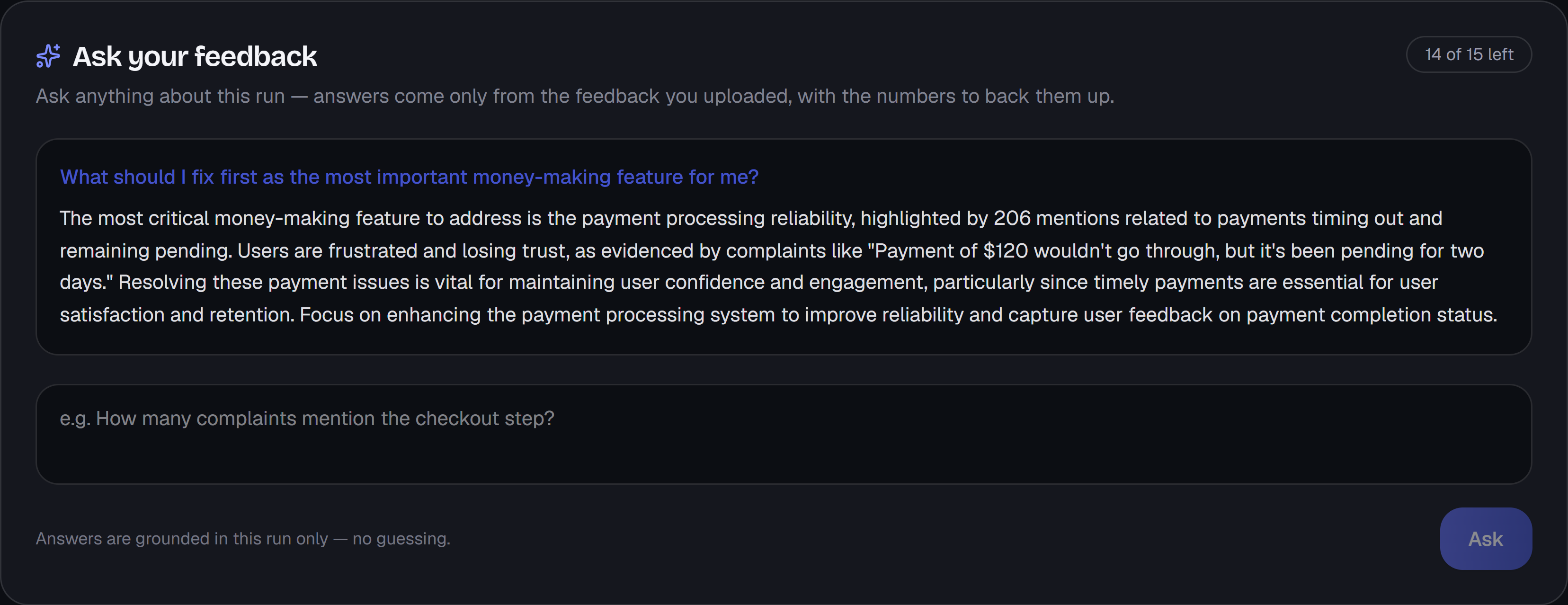
Ask a run anything in plain language — "are enterprise customers complaining about SSO?" — and get an answer drawn only from that run's evidence, with the feedback behind it. Smaller themes are in scope too, not just the top five. When the evidence doesn't support an answer, it says so instead of inventing one — and points you at the closest thing the run does cover, with the number attached. That refusal is the point: an AI that guesses is worse than no AI when you're about to move the roadmap.

  • Answers grounded strictly in that run's evidence
  • Refuses what the feedback can't support — and says what it can
  • 10 questions per run on Starter, 15 on Pro
gliddesignal · run / ask your feedback
The Ask your feedback panel, showing 14 of 15 questions left. Asked what to fix first as the most important money-making feature, the answer names payment processing reliability, citing 206 mentions of payments timing out and remaining pending, and quotes a customer whose payment of $120 sat pending for two days. A line below reads: answers are grounded in this run only — no guessing.
Captured from the app. The dataset is a sample built for a fictional banking app — the analysis is the product's own.

09Accuracy

Intent gate

Praise never inflates your problem counts

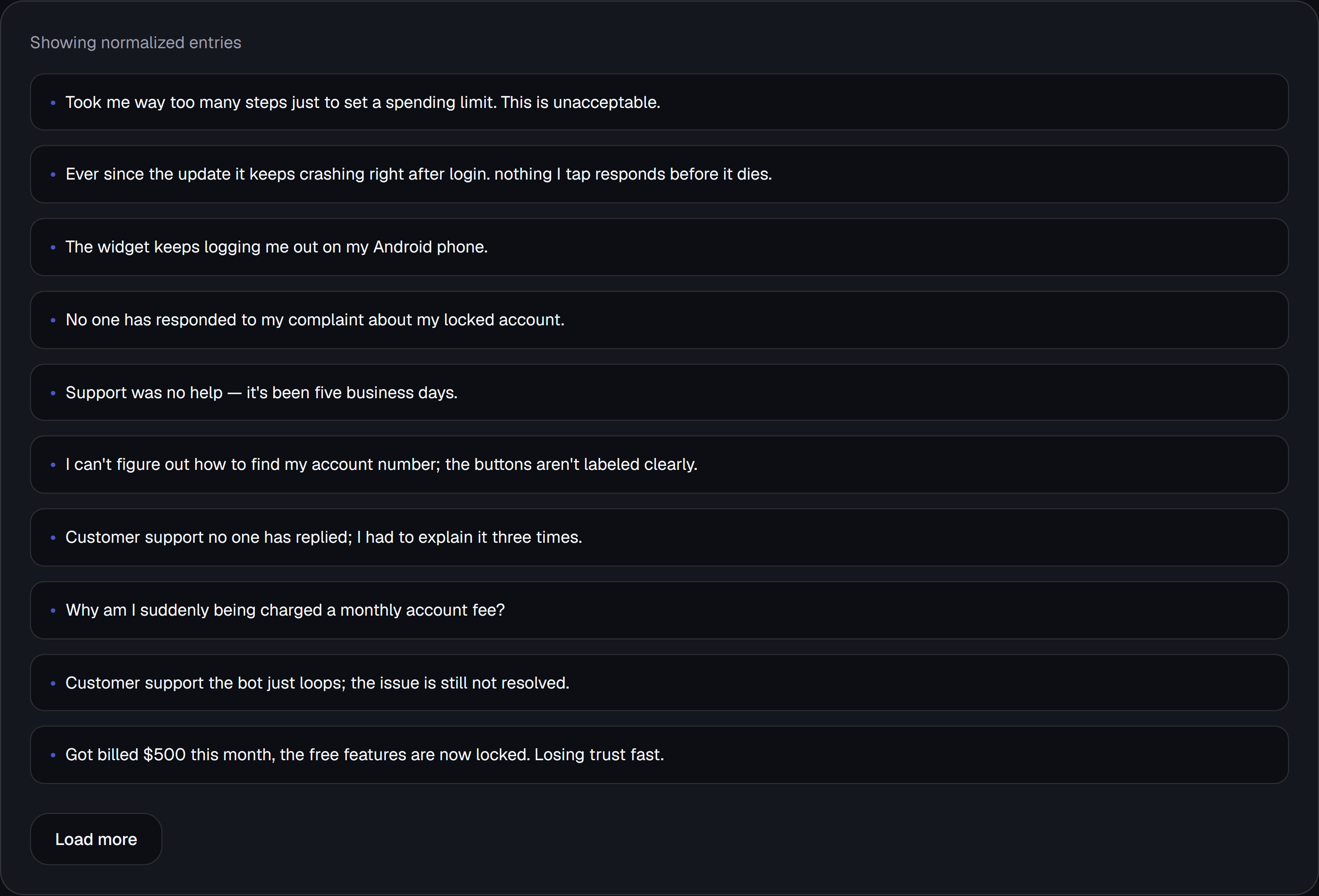
Before anything is grouped, an intent gate labels every entry — complaint, praise, suggestion, or neutral — and drops the praise so it can't pad a problem count. Everything else still feeds the themes. So a wave of five-star love never drowns out the issue that's actually costing you customers. The labels keep working after that: a theme your customers mostly asked for is written up as a request rather than a defect, so "users want offline mode" doesn't reach your leadership as something that broke. Once feedback is uploaded you can read the normalized entries yourself — every one the gate will weigh, before a run touches them.

  • Complaint / praise / suggestion / neutral, per entry
  • Praise is dropped so it can't inflate a problem's count
  • A request-led theme is titled and actioned as demand, not a bug
  • Honest numbers you can take into a roadmap review
gliddesignal · project / feedback
The normalized feedback entries for an uploaded batch, listed one per row under the heading “Showing normalized entries”: too many steps to set a spending limit, the app crashing right after login since the update, a widget logging the user out on Android, an unanswered complaint about a locked account, support that was no help after five business days, an account number the user can't find because the buttons aren't labelled clearly, a support thread explained three times with no reply, an unexpected monthly account fee, a support bot that loops without resolving anything, and a $500 bill with the free features now locked. A Load more button sits at the foot.
Captured from the app. The dataset is a sample built for a fictional banking app — the analysis is the product's own.

10Accuracy

Self-learning loop

It gets sharper every time you correct it

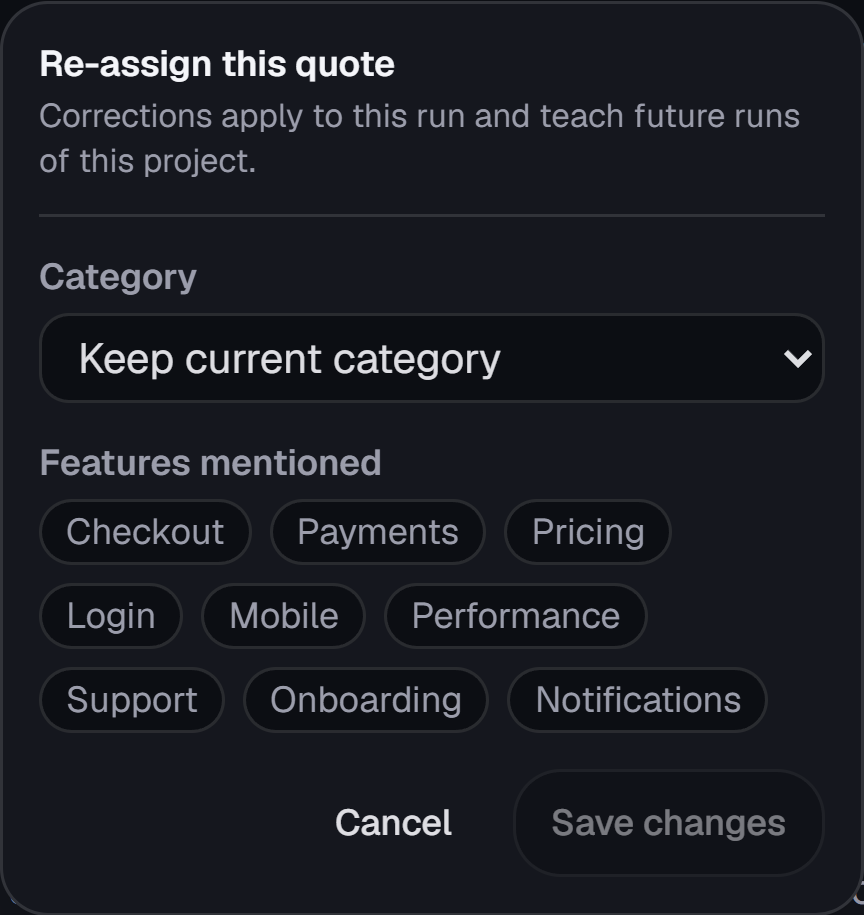
Rename a problem, re-tag a quote, edit an action, or 👍/👎 the memo or an answer — each correction is remembered for that project and quietly steers future runs toward your team's vocabulary and house style. Rating an answer shapes how it's written, never what it's allowed to claim. No model fine-tuning, and zero corrections means default behavior.

  • Correct anything inline — quotes, problems, actions, memo, answers
  • Future runs adopt your vocabulary and style
  • Zero corrections = default behavior, nothing to configure
gliddesignal · run / correct a quote
The inline correction popover for re-categorising a customer quote, headed “Re-assign this quote” over a note that corrections apply to this run and teach future runs of this project. A Category dropdown reads “Keep current category”, and below it a “Features mentioned” row of toggleable tags — Checkout, Payments, Pricing, Login, Mobile, Performance, Support, Onboarding, Notifications — with Cancel and Save changes buttons.
Captured from the app. The dataset is a sample built for a fictional banking app — the analysis is the product's own.

11Accuracy

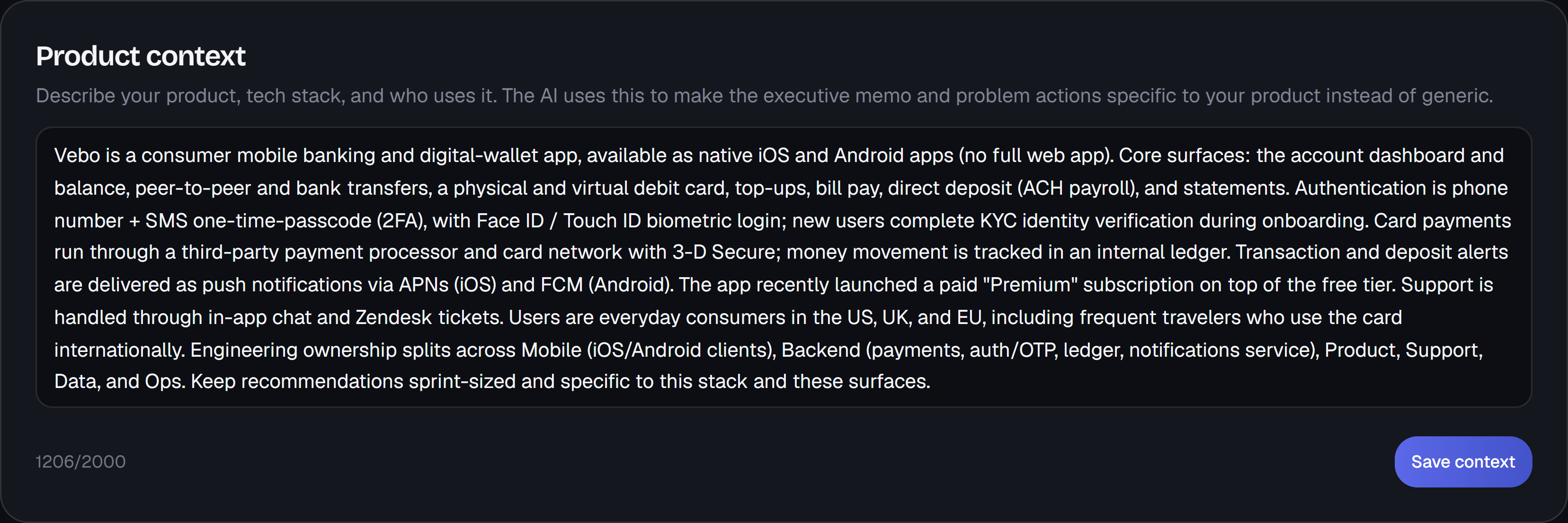
Product context

Tell it what you build, once

Describe your product, your stack, and who uses it in one box on the project — and every run after that writes in those terms. It feeds the memo, the suggested actions, and the labels on problem themes, so you get "the CVV step on mobile checkout" instead of a generic hedge about payment friction. It's optional, and it's the single biggest lever on output quality. Leave it empty and runs don't fall back to generic: they work from what the project already shows — its name, the channels the feedback came through, and the features your customers actually mention.

  • One box per project, not per run
  • Feeds the memo, the actions, and the theme labels
  • Left empty, runs read your project's own data instead of hedging
gliddesignal · project / product context
The Product context editor, headed “Describe your product, tech stack, and who uses it. The AI uses this to make the executive memo and problem actions specific to your product instead of generic.” The box holds a paragraph describing Vebo as a consumer mobile banking and digital-wallet app — its core surfaces, phone-plus-OTP authentication with biometric login, third-party payment processor, push notification providers, and the engineering teams that own each area — ending with an instruction to keep recommendations sprint-sized. A counter reads 1206 of 2000 characters, beside a Save context button.
Captured from the app. The dataset is a sample built for a fictional banking app — the analysis is the product's own.

Begin

See it on your own feedback.

Connect a source or drop in a batch, and watch these 11 capabilities turn it into a decision.

14 days · no credit card required